Generate feedback
Everything you need to know about transforming annotations into feedback and publishing it.
Last updated About 1 year ago
We need your feedback 🫰🏼
This version reflects our first iteration. We’d love to learn more about your feedback preferences to further improve the user experience and design of the feedback report. Please, share your feedback and ideas with us at https://clairelabs.featurebase.app/.
One of the biggest perks of using Claire is being able to transform your raw notes into well-written, personalized feedback that follows best practices without adding to your workload.
How it works
Whenever you click the Generate report button in the reading or rubric view, our AI synthesizes all of your notes (both Comments and Grading remarks plus their respective sentiments) and drafts feedback for your student.
Your notes are the exclusive source for the feedback, which prevents Claire from generating generic feedback. This ensures that Claire’s output remains limited to your own observations rather than inferring and, as such, prevents hallucinations and other non-deterministic attributes of generative AI. More about notes here: Annotate submissions
AI writing style
Persona and tone
Claire uses a warm, friendly, and engaging conversational style, often using contractions (e.g., "you're" or "it's") to sound more natural and approachable. She also directly addresses the student using "you," fostering a personalized and direct connection and follows a specific narrative structure designed for clarity and impact:
Claire begins by acknowledging 1-2 key strengths of the student's work, highlighting what they did well.
She then smoothly transitions to discussing the primary areas where improvement is needed.
Lastly, she concludes with a forward-looking statement, often connecting a noted strength to a path for future growth or improvement.
Specificity and actionability
Instead of generic praise (e.g., "amazing," "perfect"), the feedback explains why something was effective. Similarly, areas for improvement are discussed clearly and helpfully, linking back to concrete observations from your notes.
Content basis
The content of the feedback is exclusively derived from your notes. Claire does not invent, assume, or infer any performance details not explicitly stated by you, ensuring that the feedback is authentic to the assessment and compliant with AI policies.
Encouragement
Encouragement is woven naturally into the specific feedback rather than being delivered as generic motivational sayings. The aim is to motivate by building on identified strengths and providing clear direction for growth.
Share feedback
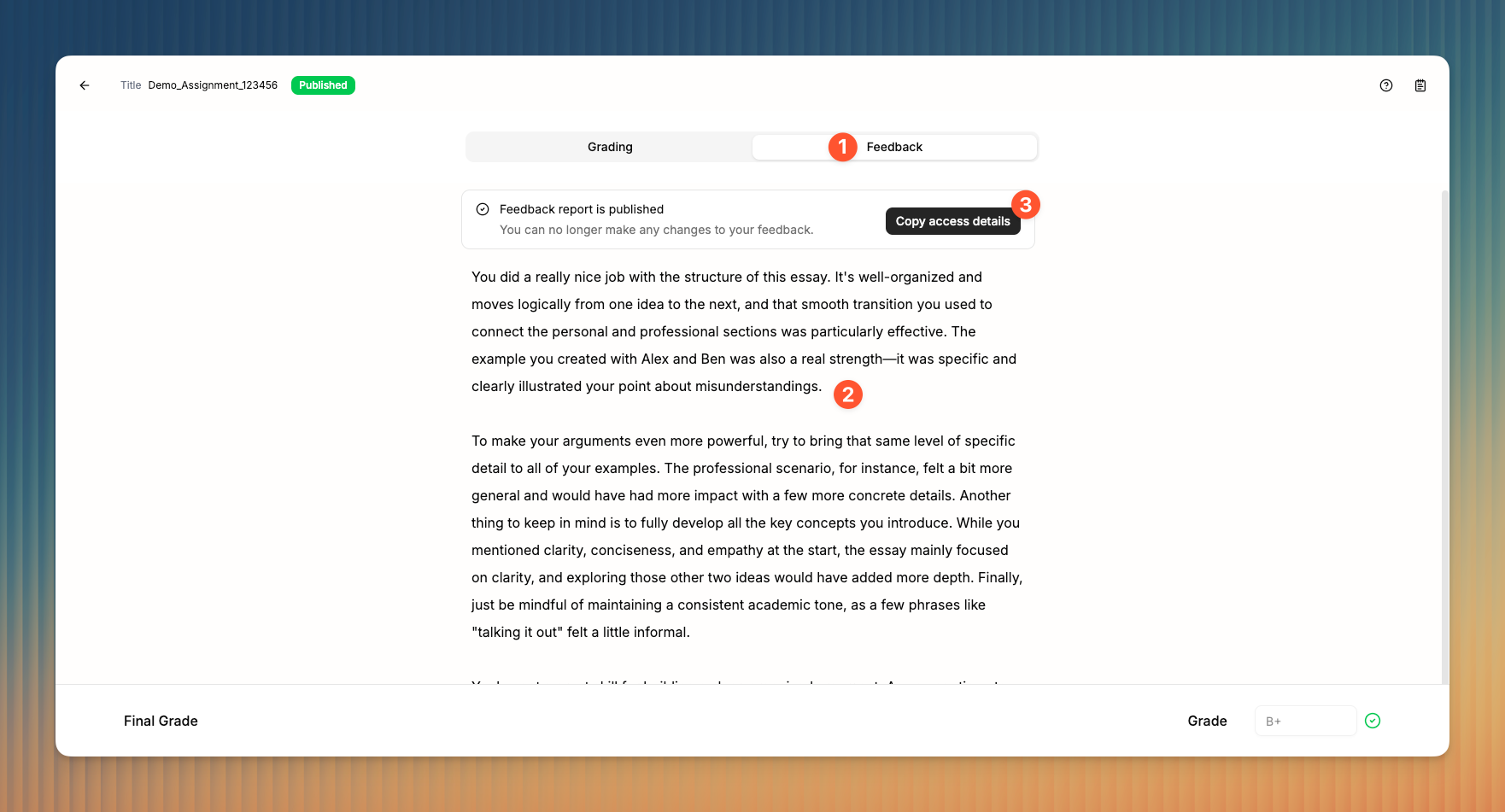
You can access the feedback by clicking Feedback in the tab menu 1.
Here you can review and make changes to the feedback text 2 as you see fit. To do so, simply click in the text to place your cursor at the desired point and start writing.
Once your feedback is published, you will find an info component 3 with a button that allows you to Copy access details, which you can then share with the student.
Good to know 👋🏼
The current version of the text editor is premature and will be improved in future updates. It currently only supports basic text processing commands and a limited editor interface.
Publishing student feedback
Important to remember ☝🏼
You can no longer make changes to your feedback once it’s published.
Once you’re happy with your feedback, click the Publish feedback button in the navigation bar to publish your feedback on a dedicated, secure subdomain. Once published, you’ll find the feedback access details above the feedback text as shown above.
The access details to your feedback report will look like this (example):
Code: xxxxxx
URL: https://feedback.clairelabs.ai?id=xxxxxxxxxx
If you’d like to see a live feedback report sample, visit this URL and use code 536557.